Pages

Showing posts with label Security. Show all posts

Friday, May 31, 2013

11 steps to make a PC Secure


So you have just bought a new personal computer for your home (rather than for a workplace or as a server) and want to secure it (including protecting it from viruses and spyware). Privacy (including encryption, cryptography and anonymity) is a part of security but broad enough to need covering separately. Think of Privacy as the flipside of the coin. Making backups of data, defragging, system restore points are only indirectly related. Backups can actually make your data easier to steal and retrieve.
This article assumes you wish to use a network (such as the internet), share files on thumbdrives and that your PC might be physically accessible to others. If none of those apply, then your many of these steps may be redundant as your PC will already be quite secure.


---------------------------------------
--------------number=1-------------
--------------------------------------- 

Choose an operating system based on its security and vulnerability (Linux has no known active viruses in the wild, OpenBSD is focused on security). Find out if it uses limited user accounts, file permissions and is regularly updated. Make sure you update your operating system with security updates and update your other software too.
---------------------------------------
--------------number=2-------------
---------------------------------------

Choose a web browser based on its security and vulnerabilities because most malware will come through via your web browser. Disable scripts too (NoScript, Privoxy and Proxomitron can do this). Look at what independent computer security analysts (such as US-CERT[1]) and crackers (similar to hackers) say. Google Chrome[2] is more secure and has a sandbox feature[3] so it would be more difficult to compromise the system and spread the infection.
---------------------------------------
--------------number=3-------------
---------------------------------------

When setting up, use strong passwords in your user account, router account etc. Hackers may use dictionary attacks and brute force attacks.
---------------------------------------
--------------number=4-------------
---------------------------------------

Use trusted sources. When downloading software (including antivirus software), get it from a trusted source (softpedia, download, snapfiles, tucows, fileplanet, betanews, sourceforge) or your repository if you are using Linux.
---------------------------------------
--------------number=5-------------
---------------------------------------

Install good antivirus software (particularly if you use P2P). Antivirus software is designed to deal with modern malware including viruses, trojans, keyloggers, rootkits, and worms. Find out if your antivirus offers real-time scanning, on-access or on-demand. Also find out if it is heuristic. Avast[4] and AVG[5] are very good free editions. Choose one, download and install it and scan regularly. Keep your virus definitions up to date by updating regularly.
---------------------------------------
--------------number=6-------------
---------------------------------------

Download and install software to deal with spyware such as Spybot Search and Destroy[6], HijackThis[7] or Ad-aware[8] and scan regularly. I can't state this enough - you need to run a good anti spyware and anti malware program like Spybot if you search the web at all. Many websites out there exploit weaknesses and holes in the security of Microsoft Explorer and will place malicious code on your computer without you knowing about it until its too late!
---------------------------------------
--------------number=7-------------
---------------------------------------

Download and install a firewall. Either ZoneAlarm[9] or Comodo Firewall[10] (Kerio, WinRoute or Linux comes with iptables). If you use a router, this gives an added layer of security by acting as a hardware firewall.
---------------------------------------
--------------number=8-------------
---------------------------------------

Close all ports. Hackers use port scanning (Ubuntu Linux has all ports closed by default).
---------------------------------------
--------------number=9-------------
---------------------------------------

Perform Penetration Testing. Start with ping, then run a simple nmap scan. Backtrack Linux[11] will also be useful.
---------------------------------------
-------------number=10-------------
---------------------------------------

Consider running intrusion detection software (HIDS) such as ossec, tripwire or rkhunter.
---------------------------------------
-------------number=11-------------
---------------------------------------

Don't forget to think in terms of physical security! Consider something like a Kensington lock (in case of theft/unauthorised access). Also setting a BIOS password and preventing access to your machine or its removable devices (USB, CD drive etc.). Don't use an external hard drive or USB device for important data, these represent another vulnerability, as they are easier to steal/lose.
Encryption can be effective against theft. Encrypt at least your entire user account rather than just a few files. It can affect performance but can prove worth it. Truecrypt works on Windows, OS X, Linux, FreeOTFE works on Windows and Linux. In OS X (10.3 or later) System Preferences Security, click FileVault (this can take minutes to hours). In Linux Ubuntu (9.04 or later) installation Step 5 of 6 choose "Require my password to login and decrypt my home folder". This uses ecryptfs.

Wednesday, April 24, 2013

HOW HACKERS HACK PRICES OF PRODUCTS OF ONLINE STORES

WHAT IS BURP SUIT?

Burp Suit a suit of a number integrated tools which are used for security testing and vulnerability assessment. Burp suit is also used for various hacking purposes and is used by Hackers all around the world.

How to Change Prices of Online Products? (Introduction to Burp Proxy)

Burp Proxy is a tool which is a part of the set of tools integrated in Burp Suit and is used to intercept the traffic between the browser and the target application. This is used to perform a kind of man in the middle attack.

Limitation

This is effective when the data is not encrypted or a weak encryption is used by the website developer.

 This is strictly for educational purposes.

Steps:

1. Download the Burpsuite from here.

2. Open the tool and go to the proxy tab and in "options" column make sure "running" and "loopback only" are checked.

3. Now go to the target site and decide the item with whose price you want to play and add that item to your cart.

4. Now go to proxy setting of mozilla (mozilla should be you default browser if you are a techie) and make sure you have following setting.

mozilla configuration for burpsuite
 
5. Now as you can see below, this how is how your cart and price should look like.

www.hakcingtweaks.com hacking, prices of online prodcuts hack
 
6. Now in the proxy tab, make "interceptor on".
bur proxy
 
7. Now go to the website and refresh the page, Firefox will ask for confirmation click on "resend" then.

8. Go to burpsuite and your interceptor tab will look something like this if the data is not using encryption.
burp suits tutorial

9. Simply change the price by editing it, I changed it to 0.03$ as you can see below and your task is done!!
www.hakcingtweaks.com hacking, prices of online prodcuts hack

Tuesday, April 23, 2013

Tips to secure your Twitter Account

Hacking is a serious issue these days. For example, take the case of recent hacking of NPR’s (National Public Radio) twitter account and erroneous tweets were being made through it.
Twitter reported, last Feb, that about 250,000 twitter accounts were compromised following the attack, which involved many high profile accounts.
This article is about how to safeguard / secure your twitter account.


Following are some tips which I feel, may secure your twitter account:

    1.Think twice before clicking a link:

Phishing is a child’s play these days. People enjoy such stuff. Many a time, we see sort of weird tweets from our friends’ accounts which does not mean that they themselves have posted such stuff, it means they are the victim of phishing attacks. They must have clicked on some spam links or may have provided their account information on any scam website.
The question now arises how to know which link is spam and which is not and the solution is WOT (Web Of Trust).

    2.Have a Strong Password:

Be it your banking accounts or your social network accounts or any kind of account, a strong password is must. Accounts are made more vulnerable by weak passwords. I suggest to use LastPass to keep your password safe. And most importantly, never keep your name, date of birth, hometowns etc as your passwords. Your password must be long enough and should be a combination of digits, character, case sensitive, symbols etc. must be taken care of.

    3.Review Third Party Apps:


Twitter and other social networks allow a third party to access your account information if you allow them. So it is suggested to have a clear idea of what the app is about and about its reliability. Only allow reliable apps to access your private information.

   4.Ensure Secure Browsing:

Ensure that the URL contains “HTTPS” and not “HTTP”, which means you are browsing in secure mode and the website is secure.

    5.Avoid Sharing Your Location:

It's not a good idea to share your location when you tweet. As not everybody should know our location at all times. To avoid automatic sharing of your location, go to  your Account settings, scroll to “Add location to my tweets” and uncheck the checkbox or delete all the location information.

    6.Tweet Maturely and Responsibly:

Tweet wisely, for we all know, Words Once Spoken Can’t Be Taken Back. So tweet short and cool and choose your words wisely.

So these were some common tips to safeguard your Twitter account from being hacked. The slew of hacks has made it obvious that something needs to be done asap. The company suggested its users to keep a strong password following the cyber attack, which sound to me, an irresponsible Tweet, because keeping a strong password is not enough, the company must introduce two-step authentication. Techno giants like Microsoft is even thinking of implementing multi-factor authentication to ensure security of its users. 

Hopefully twitter may soon implement the same or the other sooner or later.
I hope you enjoyed reading my article. I would be obliged to see your comments below.
Thank You!!!

Tuesday, January 22, 2013

Top 5 Security Tips To Protect Your Computer From Viruses


Top 5 Security Tips To Protect Your Computer From USB Viruses

With increasing anti-virus security in place against email-aware viruses and malware, hackers are turning their attention to less well-defended routes such as USB drives. This is the latest method that’s used by hackers to torment innocent users. However, there are ways you can protect your computer from USB and Pen drive viruses.


1.Block USB Viruses
Invest in an excellent anti-virus program that has built in USB virus scan and remover. These anti-USB virus scan programs not only protect your computer from USB Autorun viruses but can also clean worms, Trojans and viruses in your USB memory sticks.You can try anti-virus programs for USB virus such as USB Virus Scan, USB Drive Antivirus and so on.


2.Disable Your Computer’s Autorun Feature


When you plug in a USB drive stick into your system, the Autorun feature initiates automatically. If your USB contains any virus programs, it’ll use the Autorun feature to infect your computer. To protect your computer, disable the Autorun feature.You can disable the Autorun feature via the Control Panel.
Alternatively, you can use antivirus software to disable and enable the Autorun feature whenever you want. Additionally, these USB blocking softwares allow system administrators to specify which removable storage drives users can access.


3.Update Your Device Driver

Keeping your USB device driver updated is a good way to ensure greater stability for your USB drives. While this won’t help eradicate USB viruses, USB device drivers are constantly updated to block viruses and deliver timely warnings. You can update your USB device drive from your Windows Computer Management feature in the Control Panel.


4.Use USB Firewall Software

USB firewalls prevent Windows OS from processing malicious programs when a virus infected portable USB device is opened. USB firewalls monitor only your USB devices, and not your CD and DVD drives. By using USB firewalls, you’ll be enabling a basic level of protection from the autorun.inf viruses that spread from portable USB devices.


5.Always Safely Remove USB Devices

Viruses are sometimes created via damaged documents. If you are transferring a set of files to your USB drive, make sure the transfer is complete before you eject the device. Always use the Safely Remove Hardware feature of Windows OS. This is because partially transferred or damaged files can in turn corrupt other files on your USB drive.. 

Must Pass Ur Comments Ur,s Comments Will be Always Welcome :)

Friday, July 27, 2012

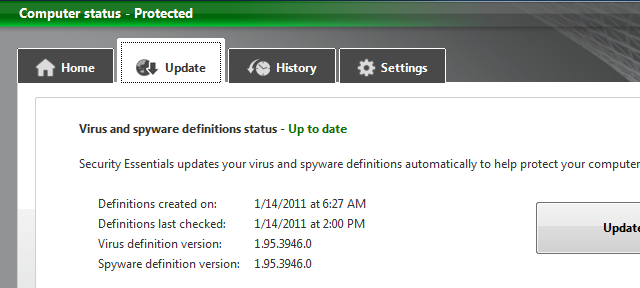
how to update Microsoft Security Essentials offline

Microsoft security essentials is free of cost antivirus and malware protection from Microsoft , you can download it from


 http://windows.microsoft.com/en-US/windows/products/security-essentials
direct download 32 bit for windows 7 English 


you need to Install the latest Microsoft Security Essentials definition updates for get protection against newest
viruses and threats and updating MSE ( Microsoft security essentials ) require working internet connection but , you can also update your MSE offline you have to download and install latest definitions from microsoft site and install them as administrator   


download for 32 bit : http://go.microsoft.com/fwlink/?LinkID=87342
download for 64 bit : http://go.microsoft.com/fwlink/?LinkID=87341
  • If your computer is running Windows Vista or Windows 7,  Right-click Mpam-fe.exe, click Run as administrator, and then click Yes. When you are prompted for an administrator password or confirmation, type the password or provide confirmation, and then wait while the definition files are installed.
  • If your computer is running any other Windows operating system, you must be logged on as an administrator to install the latest definition file. Browse to the folder where you saved the file, and then double-click Mpam-fe.exe to install the latest definition file.
  • Note: If you do not have an administrator account on the computer, ask an administrator to log on and install the definition file for you.
If you are running Microsoft Security Essentials build 2.0.0375.0 or higher,


for Network Inspection System for computers running an x64-based version of Windows.


stay safe !

Wednesday, May 9, 2012

How to Hack a Bank Account

Security on the Internet is just a dream and you know it. If a hacker wants to do something, he or she can do it. If one system is secure and cannot be hacked, then they will steal the data of someone who has access to it, and then, do the "work" from the inside. Do you think you're safe just because some sites ask you forauthentication?Let me tell you that not even CAPTCHA is secure. Nothing is.

Have you noticed that when you want to do an online transaction the bank site asks you a lot of stuff so that they properly identify you? They go very deep with these questions. Indeed, this is a good thing, otherwise, anybody that would know a little something about you could easily get into your account. This just makes it a little harder for you to be a victim of cyber-fraud, but it does not make it impossible...

Of course, there is the classic way with the hoax site. The hackers get your data by making you visit a clone page of your bank and all the data you enter will be sent to them. But that's for gullible users, you're much smarter than that. Well, so are some hackers. Some browsers store your data, such as passwords, usernames and stuff like that. If you get infected with malware, the data on your PC will be recorded by that certain virus and sent to the hacker without you even knowing it. And sometimes you don't even need to get a virus, you just need to download some JavaScript from some page. Apart from the code that the site requires, it will also have some code that will make the hacker get access to your cookies, thus using them to transfer money, change a password and stuff like that.

It isn't easy for the average Joe to hack your account, but hackers can do it, if they strive hard enough. So what to do? Well, first thing is to be careful what you click on and the second is to deploy good security measures on your computer!

Sunday, April 1, 2012

How to Protect Yahoo Account from Hackers


2 Step verification or Second Sign-In verification is an addtional layer of security that protects your account even if your password gets hacked.This feature  is already available for facebook and Gmail accounts .Yahoo has also launched Second Sign-In verification for accounts of selected countries (U.S, Canadian, Indian, Philippines).It is expected to be rolled out for all users by March 2012.
If you enable Second Sign-in verification you have to enter a verification code (sent on your mobile) or Security answer after entering your password.This addtional step is required only if your login from a new computer or mobile.

>>How to Protect Yahoo Account from Hackers

  • Login in to your Yahoo Account.
  • Now open your Account Information.
  • In the Sign-In and Security section look for the Second Sign-In Verification and click on it.

                          Check the box to turn on the Second Sign-In Verification feature


  • Now a pop-up window will open, in this give your mobile number on which you want to receive verification codes and click on Receive SMS.


  • You will receive Confirmation Code on your mobile, enter this code and click onVerify button.

After completion of verification process whenever you will login from a new computer ( like cybercafe) you will receive a confirmation code on your mobile and without it your account cannot be accessed.

Friday, March 30, 2012

ANONYMOUS WEB BROWSING USING SUPER HIDE IP


Anonymous browsing is all we need to keep ourself secure and stay away from attacks.When you are using static IPs the chances of being attacked is very high.We have already discussed some techniques to Find IP of anyone and how to attack .You can achieve secure browsing through many ways like using proxy servers and manually changing your ip regularly.But here we are using a simple trick to hide ourselves using a tool called Super Hide IP. - one of the best programs for the automatic change of ip address. The program will automatically work proxy server and designate it for use in your system. One feature of program - small size and very simple operation.

KEY FEATURES

Anonymous Web Surfing

Click Hide IP button and you will be assigned fake IP addresses, preventing others from getting your true IP when surfing the Internet.

Protect Your Identity

Surf anonymously to prevent hackers or identity thieves from monitoring your web activity or intercepting your personal information such as your financial information.

Choose IP Country

You can select to use fake IP from different countries via "Choose IP Country" option and can Check IP directly.

Send Anonymous E-mails

Hide your IP in E-mail headers. Be protected while sending e-mails via Yahoo!, Hotmail, GMail.

Un-ban Yourself from Forums and Restricted Websites

Use Super Hide IP to change your IP which allows you to access any forums or websites that has ever banned you.

DOWNLOAD LINK


HOW SUPER HIDE IP LOOKS

1. Using original IP,That is before hiding the actual IP


2. By using Super Hide ip,The IP is being changed to a fake one.


MAIN ADVANTAGE

You can also set your IP to change regularly in specific time interval which will increase your security so that no one will intrude in to your system and thus keep away from all IP based attacks

Please pass your comments if you found this article useful..

Kaspersky Internet Security Full Version + 10 Year License


Kaspersky Internet Security has everything that you need to stay safe and secure while you're surfing the web. It provides constant protection for you and your family whether you work, bank, shop or play online.Stay ahead of the threats with Kaspersky Internet Security .

Instructions:

1. Remove any installed keys.
2. Disable Self-Defense from Kaspersky settings.
3. Exit Kaspersky.
4. Install the crack.
5. Enjoy !!


Friday, March 23, 2012

How Antivirus Software Works

Due to ever increasing threat from virus and other malicious programs, almost every computer today comes with a pre-installed antivirus software on it. In fact, an antivirus has become one of the most essential software package for every computer. Even though every one of us have an antivirus software installed on our computers, only a few really bother to understand how it actually works! Well if you are one among those few who would really bother to understand how an antivirus works, then this article is for you.
 

How Antivirus Works

 
An antivirus software typically uses a variety of strategies in detecting and removing viruses, worms and other malware programs. The following are the two most widely employed identification methods:
 

1. Signature-based dectection (Dictionary approach)

 
This is the most commonly employed method which involves searching for known patterns of virus within a given file. Every antivirus software will have a dictionary of sample malware codes called signatures in it’s database. Whenever a file is examined, the antivirus refers to the dictionary of sample codes present within it’s database and compares the same with the current file. If the piece of code within the file matches with the one in it’s dictionary then it is flagged and proper action is taken immediately so as to stop the virus from further replicating. The antivirus may choose to repair the file, quarantine or delete it permanently based on it’s potential risk. 
As new viruses and malwares are created and released every day, this method of detection cannot defend against new malwares unless their samples are collected and signatures are released by the antivirus software company. Some companies may also encourage the users to upload new viruses or variants, so that the virus can be analyzed and the signature can be added to the dictionary.
Signature based detection can be very effective, but requires frequent updates of the virus signature dictionary. Hence the users must update their antivirus software on a regular basis so as to defend against new threats that are released daily.
 

2. Heuristic-based detection (Suspicious behaviour approach)

 
Heuristic-based detection involves identifying suspicious behaviour from any given program which might indicate a potential risk. This approach is used by some of the sophisticated antivirus softwares to identify new malware and variants of known malware. Unlike the signature based approach, here the antivirus doesn’t attempt to identify known viruses, but instead monitors the behavior of all programs.
For example, malicious behaviours like a program trying to write data to an executable program is flagged and the user is alerted about this action. This method of detection gives an additional level of security from unidentified threats.
File emulation: This is another type of heuristic-based approach where a given program is executed in a virtual environment and the actions performed by it are logged. Based on the actions logged, the antivirus software can determine if the program is malicious or not and carry out necessary actions in order to clean the infection.
Most commercial antivirus softwares use a combination of both signature-based and heuristic-based approaches to combat malware.
 

Issues of concern

 
Zero-day threats: A zero-day (zero-hour ) threat or attack is where a malware tries to exploit computer application vulnerabilities that are yet unidentified by the antivirus software companies. These attacks are used to cause damage to the computer even before they are identified. Since patches are not yet released for these kind of new threats, they can easily manage to bypass the antivirus software and carry out malicious actions. However most of the threats are identified after a day or two of it’s release, but damage caused by them before identification is quite inevitable.
Daily Updates: Since new viruses and threats are released everyday, it is most essential to update the antivirus software so as to keep the virus definitions up-to-date. Most softwares will have an auto-update feature so that the virus definitions are updated whenever the computer is connected to the Internet.
Effectiveness: Even though an antivirus software can catch almost every malware, it is still not 100% foolproof against all kinds of threats. As explained earlier, a zero-day threat can easily bypass the protective shield of the antivirus software. Also virus authors have tried to stay a step ahead by writing “oligomorphic“, “polymorphic” and, more recently, “metamorphic” virus codes, which will encrypt parts of themselves or otherwise modify themselves as a method of disguise, so as to not match virus signatures in the dictionary.
Thus user education is as important as antivirus software; users must be trained to practice safe surfing habits such as downloading files only from trusted websites and not blindly executing a program that is unknown or obtained from an untrusted source. I hope this article will help you understand the working of an antivirus software.

Thursday, March 22, 2012

how to create strong and secure passwords

At present we need a password or PIN for every almost every online activity and strong password is very important, as every users wants to protect their personal files, information & other data and avoid hackers from getting into their accounts.
However, not everyone can come up with a nice strong password, which is why we have compiled a list of two online tools that help users to create strong and unpredictable passwords
 
"Make Password" is a Web application that help users to generate strong password, for Social networks, email ID etc
1.png (1366×730)

The PIN or Codes generated by "Make Passwords" is generated on Random basis and are not stored anywhere.
You  can select the “Password Strength” option, which displays the strength of the password generated, in a range of 0 – 100 (with above 75 are Strong).
Once the user can picked out all the options, just click “Make Password(s)” and the passwords will be displayed in "Plain text" "Web page" or in "CSV" file.
 
 "PassWord Bird" is an Best and Recommended Webapp for Creating secure password related with your name, your Special thing, Special Date etc :)
2.png (320×143)

Just as you provide special words, names, dates etc it will instantly create an Secure Combination for you. You can select "make new one: to generate new unique password on random basis.One thing to note is that the website don't use any special symbols (! @ # $ % & * ), But it uses upper and lower case and Numbers in generating 'Secure Password'So now onwards if you want to change your password, or want to keep your data secure. Use these Webapps to create some of the most 'Secure Combinations' :)) Cheers ~~There are plenty of service like Free Password Generator. You can even use them but recommended is to use from given above.