Pages

Thursday, August 16, 2012

Backtrack r3 tutorials | Upgrade From BackTrack 5 R2 to BackTrack 5 R3

Backtrack r3 tutorials

 
Recently,  released the long-awaited BackTrack 5 R3 but for those of you who don’t want to start fresh with a new installation, have no fear because you can easily upgrade your existing installation of R2 to R3.
Our primary focus with this release was on the implementation of various bug fixes, numerous tools upgrades and well over 60 new additions to the BackTrack suite. Because of this, the upgrade path to BackTrack 5 R3 is relatively quick and painless.
First, you will want to make sure that your existing system is fully updated:
apt-get update && apt-get dist-upgrade
With the dist-upgrade finished, all that remains is the install the new tools that have been added for R3. An important point to keep in mind is that there are slight differences between the 32-bit and 64-bit tools so make sure you choose the right one.

32-Bit Tools

apt-get install libcrafter blueranger dbd inundator intersect mercury cutycapt trixd00r artemisa rifiuti2 netgear-telnetenable jboss-autopwn deblaze sakis3g voiphoney apache-users phrasendrescher kautilya manglefizz rainbowcrack rainbowcrack-mt lynis-audit spooftooph wifihoney twofi truecrack uberharvest acccheck statsprocessor iphoneanalyzer jad javasnoop mitmproxy ewizard multimac netsniff-ng smbexec websploit dnmap johnny unix-privesc-check sslcaudit dhcpig intercepter-ng u3-pwn binwalk laudanum wifite tnscmd10g bluepot dotdotpwn subterfuge jigsaw urlcrazy creddump android-sdk apktool ded dex2jar droidbox smali termineter bbqsql htexploit smartphone-pentest-framework fern-wifi-cracker powersploit webhandler

64-Bit Tools:

apt-get install libcrafter blueranger dbd inundator intersect mercury cutycapt trixd00r rifiuti2 netgear-telnetenable jboss-autopwn deblaze sakis3g voiphoney apache-users phrasendrescher kautilya manglefizz rainbowcrack rainbowcrack-mt lynis-audit spooftooph wifihoney twofi truecrack acccheck statsprocessor iphoneanalyzer jad javasnoop mitmproxy ewizard multimac netsniff-ng smbexec websploit dnmap johnny unix-privesc-check sslcaudit dhcpig intercepter-ng u3-pwn binwalk laudanum wifite tnscmd10g bluepot dotdotpwn subterfuge jigsaw urlcrazy creddump android-sdk apktool ded dex2jar droidbox smali termineter multiforcer bbqsql htexploit smartphone-pentest-framework fern-wifi-cracker powersploit webhandler

Backtrack 5 r3 Tutorials | How to install Backtrack 5 R3

Now i'm going to teach about "How to install backtrack 5 R3 in windows , Linux , and Mac.

 Watch this Video and try now..


How to Recover Data from a Crashed Hard Drive


Today, we will help you how to Recover Data from a Crashed Hard Drive. When your PC switch off suddenly due to any hardware failures or software error problems. If you are regular computer user; you may know that a hard drive failure is an unpredictable situation. It happens very often that your hard drive gets crashed and you ultimately lose you precious saved data and files leading to great discontentment and grief. It's really a worst condition when you are working on an important file or data or picture etc and suddenly everything gets blank and Oh God, your hard disk breaks down. And it becomes even more critical when you don't have any backup installed in your computer at all.
Though crashing hard drive means total data loss from your computer system but now with the advancements in IT technology, it has become possible to recover your data or file or work when the hard drive stops booting. There are various methods with which you can recover your important data and fix the problem at the ease of your own comfort without waiting for the technician to come. Here I am discussing how to recover your data from a crashed hard drive. Some times your pc may crash due to virus attacks. So in order to avoid such situtatuions you need to secure your pc with good antivirus softwares.


The first step to be taken for solving the problem is to take out the crashed hard drive from the system. Then install this hard drive in another computer as a secondary drive having Windows installed on it. After it, boot into Windows and install PC Inspector File Recovery. The software is available at free of cost and we provided the download link of the application at the end of the article. But always install it on the primary drive to avoid the over-writing of files you are going to restore. After downloading the PC Inspector File Recovery, open it and select the language. The software is compatible for all windows versions xp/vista/7 and windows 8. A welcome screen will appear with having three options in it:
Recover deleted files

This option enables you to restore only those files which have been deleted permanently from your drive and have not been over-written yet.

Find lost data

By choosing this option, you will be able to recover the data which has been lost as a result of hard drive crash. With this option, you will further get two more options of "start cluster" and "end cluster". It's better to leave the scanning process of entire drive as it takes a long time depending on the size of your drive.

Find lost drive

It is the third option which should be used when you don't see your drive letter in my computer or windows explorer. This option will help you connect the drive and to find your lost data.

But in the case, if there is no secondary computer to work with, go for the Ultimate Boot CD for Windows. With the help of UBCD, you will be able to boot into Windows which will then run utilities on the damaged drive that will help you solve the issue. With UBCD, you gain an access to various utilities and PC Inspector File Recovery is also one of them which can be run on the system from a CD. For creating UBCD for Windows, you require a PC with Windows XP and XP Installation CD. To keep your crashed hard drive into the freezer is also a successful method to recover the data or files. Download Here

If all of the above mentioned methods not work, It's time to send your hard drive in the hands of a computer technicians who will use any data recovery tool or apps to help you recover your lost data successfully. However, you may also search for a data recovery software online and get it installed on your computer system.

Hard drive crash is a common problem that can happen with anybody at any time. So search for the right option and save your precious data and files from getting corrupted.

Ilya Elbert writes for several ITSupportDenver and Computer Repair Denver companies.

Download Link for PC Inspector File Recovery

Tuesday, August 14, 2012

Backtrack 5 R3 Facebook Hacking Real!!!

Hi guys,
This video tutorials about Facebook hacking,now i show how to hack Facebook account using Backtrack r3


Don't forget to Join with us on

FACEBOOK FAN PAGE www.facebook.com/sundaravelit

Join Our Group for Help www.facebook.com/groups/hackinghelp

Keep visit for our More backtrack 5 r3 tutorials

Backtrack 5 r3 tuts,backtrack 5 tuts,Backtrack 5R3 Tutorials

Hi Friends,
 

"The time has come to refresh our security tool arsenal – BackTrack 5 R3 has been released. R3 focuses on bug-fixes as well as the addition of over 60 new tools – several of which were released in BlackHat and Defcon 2012. A whole new tool category was populated – “Physical Exploitation”, which now includes tools such as the Arduino IDE and libraries, as well as the Kautilya Teensy payload collection."
The Backtrack team has finally released a single VMware Image (Gnome, 32 bit) for those who want other backtrack flavors.
For those requiring other VM flavors of BackTrack – building your own VMWare image is easy – instructions can be found in the BackTrack Wiki.
"For the insanely impatient, you can download the BackTrack 5 R3 release via torrent right now. Direct ISO downloads will be available once all Backtrack HTTP mirrors have synched, which should take a bit more time. Once this happens, the team will update our BackTrack Download page with all links."


BT5R3-GNOME-64.torrent (md5: 8cd98b693ce542b671edecaed48ab06d)
BT5R3-GNOME-32.torrent (md5: aafff8ff5b71fdb6fccdded49a6541a0)
BT5R3-KDE-64.torrent (md5: 981b897b7fdf34fb1431ba84fe93249f)
BT5R3-KDE-32.torrent (md5: d324687fb891e695089745d461268576)
BT5R3-GNOME-32-VM.torrent (md5: bca6d3862c661b615a374d7ef61252c5)

"The quieter you become, the more you are able to hear"


Keep visit for Backtrack 5r3 Tools tutorial


Backtrack 5 r3 tuts,backtrack 5 tuts,Backtrack 5R3 Tutorials


Sunday, July 29, 2012

How To Change Facebook Password Without Knowing The Current Password

Hello guys today i am gonna tell you the way how to change the password of your Facebook account without knowing the current password . this is actually a Facebook password recovery tool which fails ;) .


Hint : if you find any account login in any cafe or in school you can change his/her Facebook password without knowing his/her current password . I guess you understand what i mean ?


NOTE : This is Only For Educational Purpose , Don't Use This Information To Harm Innocent People

Steps :


You will redirect to a page . now click on continue .
  • Then click continue again .
You will get option to change your password without knowing your current password . 
For any queries let me know in comments :)
 
Join on Facebook

https://www.facebook.com/groups/hackinghelp

Like us

https://www.facebook.com/sundaravelit


Friday, July 27, 2012

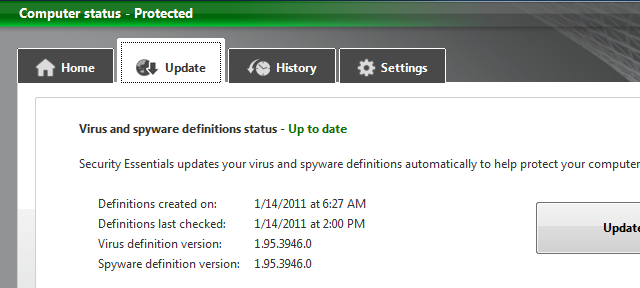
how to update Microsoft Security Essentials offline

Microsoft security essentials is free of cost antivirus and malware protection from Microsoft , you can download it from


 http://windows.microsoft.com/en-US/windows/products/security-essentials
direct download 32 bit for windows 7 English 


you need to Install the latest Microsoft Security Essentials definition updates for get protection against newest
viruses and threats and updating MSE ( Microsoft security essentials ) require working internet connection but , you can also update your MSE offline you have to download and install latest definitions from microsoft site and install them as administrator   


download for 32 bit : http://go.microsoft.com/fwlink/?LinkID=87342
download for 64 bit : http://go.microsoft.com/fwlink/?LinkID=87341
  • If your computer is running Windows Vista or Windows 7,  Right-click Mpam-fe.exe, click Run as administrator, and then click Yes. When you are prompted for an administrator password or confirmation, type the password or provide confirmation, and then wait while the definition files are installed.
  • If your computer is running any other Windows operating system, you must be logged on as an administrator to install the latest definition file. Browse to the folder where you saved the file, and then double-click Mpam-fe.exe to install the latest definition file.
  • Note: If you do not have an administrator account on the computer, ask an administrator to log on and install the definition file for you.
If you are running Microsoft Security Essentials build 2.0.0375.0 or higher,


for Network Inspection System for computers running an x64-based version of Windows.


stay safe !